Enable the Factory and Test
- Select the Maintenance Unit MyTestMU and type the location of the new factory in the Workspace Assembly Service field:
MyAssembly.MyFactory - Save .
- Expand Maintenance Unit > Cube View Groups > MyViews.
- Select the Cube View SomeCubeView.

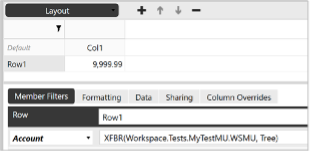
- In Rows and Columns, select Row1 and enter the following member filter:
XFBR(Workspace.Tests.MyTestMU.WSMU, Tree)
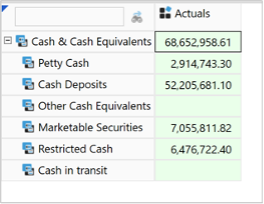
- Save and execute the Cube View. If successful, it should show only a small subset of the Account dimension.
note
EXERCISE COMPLETED! 🎉 Stop here, or continue on to Exercise 2.