Setup Dynamic Dashboard
- Select assembly CalcByFreqSharp.
- Select file DynamicDashboardSvc.cs in the Services folder.
- Search for FIX 1.

- As described in the comment underneath “FIX 1”, uncomment lines containing code and fix them by replacing the template REPLACE_WITH_CORRECT_FUNCTION with the actual api call
GetDynamicComponentsForDynamicDashboard(use IntelliSense to complete to help avoid typos).
WsDynamicComponentCollection comps = api.GetDynamicComponentsForDynamicDashboard(si,
    workspace, dynamicDashboardEx, String.Empty,
    null, TriStateBool.Unknown, WsDynamicItemType.Unknown);
- Apply changes for FIX 2, in this case using the api method
GetComponentUsingBasedOnNameand the Embedded Component name embDBF.
WsDynamicDbrdCompMemberEx embComp = comps.GetComponentUsingBasedOnName("embDBF");
- Apply changes for FIX 3. Use IntelliSense to locate the
EmbeddedDashboardNameproperty of the component, which we will manipulate.
embComp.DynamicComponentEx.DynamicComponent.Component.EmbeddedDashboardName = dashboardName;
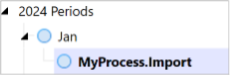
7. From OnePlace, expand Jan and select MyProcess.Import. A (dynamically defined) dashboard should display.
note
EXERCISE COMPLETED! 🎉 Stop here, or continue on to Exercise 3.